How to Use Hashtags on Twitter properly
Twitter is abuzz with 140-character or less status updates about everything under the sun as people attempt to follow others and add new followers. Twitter followers don’t lack for things to talk about and hashtags provide a way to get your message to the right people at the right time. Learning to harness social media to develop your brand, sell a product or just connect with likeminded people requires an understanding of the special technique known as hashtagging.

What’s in a Twitter Hashtag?
Hashtags provide a way to categorize your content to make it more visible in Twitter Search so that new followers can follow you. Without adding the tag, the content is generally restricted to those that follow you and their friends. Using them can increase your social presence by attracting others that are looking for similar content. If a tag becomes extremely popular, it ends up as a Trending Topic and generally search for and follow users that write about Trending Topics.
Twitter recommends that you use hashtags only on Tweets that are related to the topic to help people find and follow your profile. For example, you wouldn’t write a status talking about the latest movie you watched while using a tag for pizza, because that wouldn’t help someone that wanted to follow you find your content. Twitter mentions that the hashtag is only for use with categorizing content, but in reality, followers may use it as a way to create a conversation, to describe a trend, or for humor. They are only limited to your imagination, and sometimes people will follow a user that creates a unique and humorous tag about a Trending Topic.
On the most basic level, hashtags are a great way to increase your Twitter following by getting more people to follow you and quickly and easily categorize your Tweets. Creating a tag to advertise and promote something also makes it possible for others to discuss your brand, follow your promotions and talk about it in their own Tweets.
Creating Twitter Hashtags
The actual technique for creating a tag is very simple. Simple add the # sign before the word you want to turn into a hashtag. When you post the message, that word becomes a link that other users can follow. If a user searches for your tag it will appear in a list of results, sorted by the most recent Tweets. The tags only apply to the word immediately following the # sign. For example, entering the hashtag #barn would make your content show up in the search results when a potential follower searches for the word barn. People who like your content may choose to follow you as a result.

As you become more familiar with them you will start to understand how to make them work for your personality, company or brand. They can be placed anywhere within the Tweet. When you add a hashtag, make sure to use normal spacing between words; otherwise it won’t work properly. There must be a space before the # symbol and no space between the hashtag and the word used.
There is a fine line between creating a tag that is going to be found in search results, and one that is so popular, there is virtually no chance of anyone finding your Tweet to follow. You can add more than one to your Tweet to improve the chances of your Tweet appearing in a Twitter user’s search results.
Brand Monitoring via Twitter Hashtags
They can be used to brand your company and help others find all Tweets related to your company name. If you have a unique company name, that makes it even easier for people that visit your restaurant, band or other service to find you. When promoting your brand, place the it at the end of the Tweet. Placing it at the front of the Tweet obscures the message. Since the most important part of the tweet is going to be the message, and you only add a brand hashtag to help people find your Tweet, it makes the most sense to place it at the end.

Promoting Your Events via Hashtags
Another good use for tags involves promoting your event or service. You can add one for your event and then include that one in event-related tweets, on flyers and your website to help others find information relevant to an event. They provide a great way for people attending your event to discuss their findings in real time. This can end up pulling in additional people and getting a larger attendance than you might get without using a tag.
When promoting your event, be careful about creating a tag that might draw criticism from Twitter followers. The #McDStories tag is a famous example of how a hashtag that was intended to be a positive boon for the fast food giant, turned into a bashing campaign. Of course, there are instances where negative publicity is still better than no publicity. Weigh your options and carefully consider your event and audience when creating some for your event.

Tweet Locations and Moods with Hashtags
Including a location or adding a description is another way to use Tweets. It can effectively be done with tags in the sentence. Since Twitter limits the number of characters you can use, users and your own followers often include their mood or current weather in your Tweets. This has the advantage of advertising your Tweets in search results and letting people know how you feel. For example, you might Tweet, “Worst bike ride in history #rain #ruins #everything.” With that Tweet, hashtags do play an effective role and you get listed for three possible categories while at the same time telling others why your ride wasn’t enjoyable.
You can also use a Tweet to talk about your current location. For example, if you add a picture of your trip to Japan, add #Kyoto #Japan to indicate the precise location of the photo and allow others searching for information about Kyoto to find your content. Use locations and moods sparingly as some followers may find it an abuse of the system. It’s perfectly fine to give your location, or even include a link to a Google Map when you are hosting an event. Just keep your them relevant and avoid overusing the system.
Twitter Hashtags: Too Much of a Good Thing?
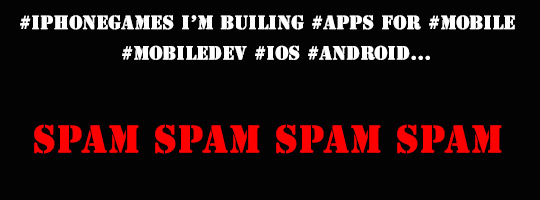
Overloading your Tweets can do serious damage to your Twitter profile. Some people can get away with adding several of them to a Tweet, but for most people, it’s going to come across as excessive. Unless you have a very good reason to include additional ones, you should limit them to two per post. This prevents you from overusing the system and annoying your followers.
Using too many hashtags is largely a practical issue. When you are limited to 140 characters, adding too many of them takes away from the actual content of the Tweets. You still want to provide value and information to people. Simply posting a list of trending tags isn’t going to endear you to followers. More than two of them per post is considered to be SPAM by most followers. While Twitter can sometimes seem impersonal, remember that in most cases there is a real person behind the followers that consume your Tweets. If you wouldn’t read your own updates on Twitter because of too many tags, why should your followers?